G Pen Elite II Vaporizer

G Pen Elite II Vaporizer

G Pen Elite II Vaporizer

This is a dry herb vaporizer - Learn More

  • Hybrid Heating Technology (Conduction + Convection)

  • Full-Color Display with Haptic Feedback

  • Individual Temperature Control

  • Ceramic Chamber with 0.5g Capacity

  • Built-in pick tool for easy loading / unloading

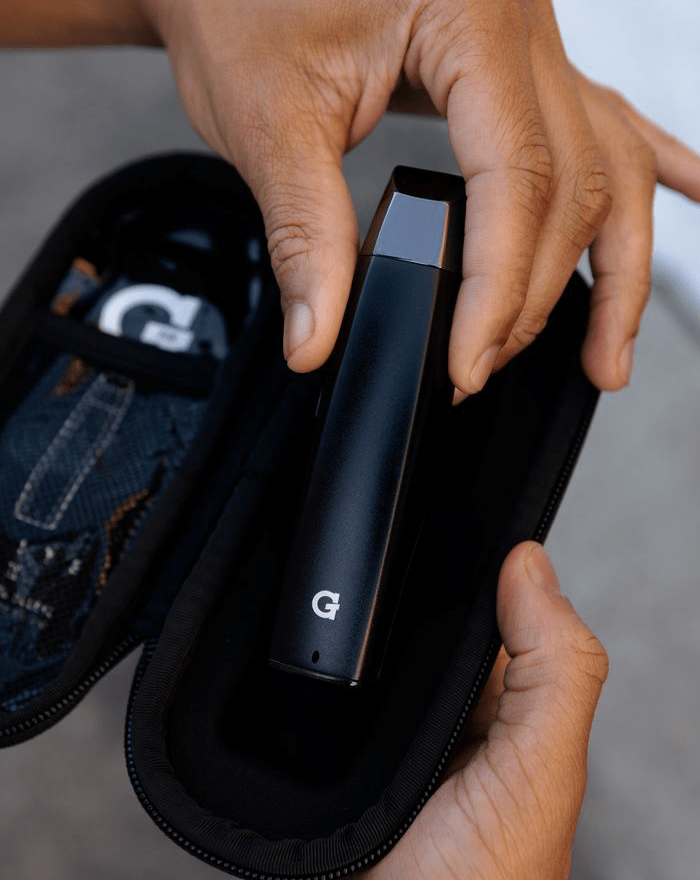
  • Hemp Travel Case Included

  • Hybrid Heating Technology (Conduction + Convection)

  • Full-Color Display with Haptic Feedback

  • Individual Temperature Control

  • Ceramic Chamber with 0.5g Capacity

  • Built-in pick tool for easy loading / unloading

  • Hemp Travel Case Included

  • Built-in carb for airflow control

$199.95 Regular price
/

Earn $199.95 USD points for Loyal G VIP Members.
What is this?

Please allow 3-5 business days for processing and shipment

2-Year warranty included out of the box


Why choose the G Pen Elite II Vaporizer?

With the Elite II, you get a conduction/convection dual heater system that offers complete control over your vapor production. Dial in the perfect hits with the fully adjustable temp displayed on a high-resolution display. Get the most out of your vape sessions every time.

Free domestic ground shipping on all orders over $100+

What's in the box?

  • G Pen Elite II Vaporizer for Dry Herb

  • G Pen Elite II Silicone Sleeve

  • USB C Charging Cable

  • Pick Tool

  • Hemp Travel Case

Handheld & Powerful

Overall rating: 4.8472223 / 5 from 144 reviews.

AI Generated Review Summary

Summary topics

Review topics: [].

Review highlights

Reviews

I had one of the

"I had one of the first Elite's years ago and loved it. This one is so much better! Everything from the feel, to the heating, to the maintenance is so simple. If you're thinking about it, just do it. You won't be disappointed."

— Nathan M. (5/5)

works great love this device

"works great love this device"

— Chris G. (5/5)

The Elite 2 is a

"The Elite 2 is a great product that takes some getting used to. I ended up buying a funnel from Amazon as it can be difficult to load due to the loading chambers cylindrical shape. I also bought a grinder from Flower Mill with a fine grinding plate that makes grinding and vaping flower enjoyable"

— Gerrette A. (4/5)

Fantastic customer service from Jason

"Fantastic customer service from Jason at the G Team. I love my Elite 2 dry herb vap pen, and am a GPen customer for life."

— Rene S. (5/5)

The G Pen Elite II

"The G Pen Elite II has been a game changer for me. The adjustable temperature is key to getting "everything" that your bud has to offer. I had a Pax, but it didn't do the job. I seldom used it, although I did appreciate its large bowl and charge life. I appreciate the quick charging of the G Pen so I really don't have to go without and return to smoking. My lungs appreciate everything about the Pen."

— Sharon J. (5/5)

I have the dash and

"I have the dash and Dash II (charging port broke). So I went for upgrade to Elite. It's easier to clean, powers up faster, longer battery life. Draws sl8ghtly better than Dash II but still occ feels plugged up. Overall I'm happy"

— Joel P. (4/5)

This is my 3rd G

"This is my 3rd G Pen Elite. They are the best I’ve ever used. Reliable, heats up quickly a joy to use"

— MICHAEL M. (5/5)

An amazing upgrade from the

"An amazing upgrade from the original. Easy to use, easy to clean. Love it"

— Don B. (5/5)

I love this open it

"I love this open it hit you out of nowhere"

— Justin B. (5/5)

A worthy upgrade

"I got this because I gave my Dash+ to a friend (I loved the Dash+), and wanted to try the latest and greatest. The Elite II lives up to the hype. It looks smooth, and the display looks bright and crisp. This vape draws smoother, probably because of the creamic core, and its more square shape feels nice. There is also a carb just above the display screen, so you can have a bit more control over how you hit it. Its also very easy to clean. As good as the Dash+ was for the last 4 years, the Elite II is a worthy upgrade!"

— Sean S. (5/5)

Q&A

Elite II 101

Using the Elite II

Cleaning the Elite II

FAQ

The Elite II is powered on by pressing and holding the unit’s power button (marked with “o” on the device) for four seconds. The device can be powered off by holding that same button down for two seconds.
Once the G Pen Elite II is powered on, access the settings menu by clicking the power button (o) five times in rapid succession. Use the + or - button to highlight “*F / *C” and click the power button to enter, doing the same to select the type of temperature measurement desired.
To activate heating on the Elite II, click the power button (o) twice in rapid succession. You will see the temperature gauge begin to grow as the temperature itself increases up to the desired setting. Once the unit has reached the desired temperature, it will vibrate twice to indicate it is ready to use.
The G Pen Elite II features a 2100mAh rechargeable lithium-ion battery with Type-C fast-charging.
When the Elite II is powered on, you will be able to see a battery icon in the top right corner of the screen. When that bar is depleted, the Elite II will not be able to begin heating, and instead will indicate on the screen that charging is needed.
When fully charged, the G Pen Elite II will offer approximately 60 minutes of heating time.
First ensure that your device is powered off and cooled down. Then soak a cotton swab with ISO, making sure to squeeze out any excess before applying to your device. Swab all around the Silicone Insert and over the screen. Remove silicone insert and swab the interior walls and air flow hole of the mouthpiece. For an even deeper clean, remove the screen from the silicone insert and remove the spiral ceramic air path that sits above that. Soak all three components of the insert along with the outer zirconia mouthpiece in ISO. Remove from ISO, rinse thoroughly with water, and let air-dry. Assemble all components of the insert and mouthpiece and activate a session at maximum temp to burn off any residual ISO.
The G Pen Elite II can hold approximately .5g of ground material, depending on the density and fineness of the grind.
No, the G Pen Elite II is designed to only be used for ground dry materials.
4.6 x 1.2 x 1.1”
Grenco Science warrants the G Pen Elite II against defects in materials and workmanship under normal use for a period of two (2) years from the date of retail purchase by the original end-user purchaser. The same warranty can be extended to three (3) years when the device is registered on GPen.com/Register. If a physical defect arises and a claim is received within the Warranty Period, Grenco Science will exchange the defective product with a new product. The Limited Warranty does not apply to normal performance degradation of batteries or neglecting to adhere to cleaning/loading instructions.
Yes, registering your product will ensure that a warranty replacement is processed smoothly and efficiently via our Customer Service department, should you experience any operational defects in the Elite II they are unable to solve for you over the phone or via e-mail. Most importantly, you will be the first to hear of any important product updates related to your purchase of a G Pen Elite II for Ground Material. Go to GPen.com/Register, or scan the QR code on the bottom of the outer packaging to pull up the registration page, and enter your S/N, which can be found engraved into the bottom of the unit or under the “Firmware” option in the settings menu.
Once the Elite II is powered on, the settings menu can be accessed by clicking the power button five times in rapid succession. You can then use the + and - buttons to navigate the menu, and the power button (o) to select the various options. Exit the menu by selecting the “Exit” option and clicking the power button.
Once the G Pen Elite II is powered on, access the settings menu by clicking the power button (o) five times in rapid succession. Use the + or - button to highlight “Convection Boost” and click the power button to enter, doing the same to select “On” or “Off.”
Once the G Pen Elite II is powered on, access the settings menu by clicking the power button (o) five times in rapid succession. Use the + or - button to highlight “Session Timer” and click the power button to enter, doing the same to select the desired session length from the choices presented.
Yes! Once the G Pen Elite II is powered on, access the settings menu by clicking the power button (o) five times in rapid succession. Use the + or - button to highlight “Haptic Feedback” and click the power button to enter, doing the same to select “On” or “Off.”
With the G Pen Elite II is powered on, access the settings menu by clicking the power button (o) five times in rapid succession. Use the + or - button to highlight “Brightness” and click the power button to enter, doing the same to select “Bright” or “Dim.”
Download Manual